 0 Item(s)

Registration should be the simplest part of joining an online casino‚ but UK players can run into delays when signing up with bwin. A form that will not submit‚ an address that fails verification‚ or an email that never arrives can interrupt the process before a player even reaches the games. This review looks at common registration problems‚ practical steps for resolving them‚ and what to check before using the smartphone app by bwin.
bwin is a recognised gambling brand‚ but availability and product details can change. Players in Great Britain should confirm that the service they are accessing is licensed for their location and review its current terms. The operator’s website and official app store listings are the safest places to check for up-to-date information; avoid unofficial downloads or links promising special access.
What UK players may encounter during registration
Online gambling operators must establish a customer’s identity and eligibility. As a result‚ registration is not always an instant‚ one-screen process. bwin may request personal details and then verify them against records or ask for documents. A review or request for further information does not necessarily mean that an account has been rejected.
- Form validation errors: A missing field‚ unsupported character‚ or incorrectly formatted date can prevent submission.
- Address mismatch: The details entered may not match the format held by a bank or identity database. Flat numbers‚ abbreviations‚ and postcode spacing can matter.
- Duplicate account warning: An existing account‚ including one registered with an old email address‚ may block a new sign-up;
- Verification delay: The operator may need additional evidence before enabling deposits or withdrawals.
- Email or text confirmation failure: A typo‚ spam filter‚ blocked short code‚ or delayed message can stop a player from completing activation.
Only provide accurate details that match your identity documents. Do not create another account to get around a warning: duplicate accounts can complicate verification and may breach the operator’s terms. If you believe you already registered‚ use the account recovery route or contact support instead.
How to troubleshoot a failed sign-up
Check the details before submitting
Review each field carefully‚ especially your legal name‚ date of birth‚ postcode‚ and email address. Use the name shown on your identification rather than a nickname. Enter a current UK residential address in a consistent format‚ and make sure the postcode is correct. If the form rejects a character or punctuation mark‚ follow the field’s displayed instructions rather than altering your identity details.
Rule out browser and connection problems
Try refreshing the page‚ updating your browser‚ or opening the sign-up form in a different supported browser. Temporarily disable content-blocking extensions if they interfere with the form‚ and check that cookies and JavaScript are enabled where required. Avoid repeatedly submitting the form: multiple attempts can trigger security checks or make it harder to identify the original error.
If you are registering on a phone‚ switching between a stable Wi-Fi connection and mobile data may help identify a connection issue. For the app‚ install only the version linked from bwin’s official site or the relevant official store. If the app freezes‚ update it and restart your device before trying again. Do not install files from third-party download pages.
Complete verification safely
If bwin asks for documents‚ use the secure upload method provided through the official account area or support instructions. Check that images are readable‚ complete‚ and not cropped. Never send passwords‚ full card security codes‚ or one-time login codes by email or chat. If a request seems unusual‚ independently navigate to the official site and ask support to confirm it.
Verification times can vary‚ and support may not be able to give an immediate resolution. Keep a note of the date‚ the error message‚ and any case reference. Share only the information requested through an approved channel‚ and do not post identity documents publicly or in social media comments.
Using the app after registration
Once an account is approved‚ the smartphone app by bwin can provide access to account features and casino content where those services are available to the player; The app does not remove identity checks or change the operator’s rules. Registration‚ verification‚ deposit limits‚ and withdrawal checks still apply‚ and some features may differ between the app and website.
Before depositing‚ inspect the cashier options and the relevant payment terms. Confirm minimum and maximum amounts‚ processing times‚ and any restrictions that may apply to a payment method. A deposit appearing in an account does not guarantee that a withdrawal will be immediate: the operator may need to complete checks first. Use a payment method in your own name and keep records of transactions.
Players should also review the casino’s bonus terms before opting in. Promotional offers may have eligibility rules‚ expiry dates‚ game restrictions‚ and wagering requirements. A bonus is not free cash with no conditions‚ and it may affect the order in which funds are used or withdrawn. If the terms are unclear‚ ask support before accepting the offer.
Questions and answers
Why does bwin say my details cannot be verified?
The submitted information may not match the records used for checks‚ or the operator may need extra evidence. Check for spelling or formatting differences‚ then follow the official verification instructions. If the details are correct‚ contact support rather than changing them to something inaccurate.
What should I do if the activation email does not arrive?
Check the spam and junk folders‚ confirm that you entered the right address‚ and allow some time for delivery. Use the account page to request another message if that option is available. If you still cannot activate the account‚ ask bwin support to check the email status.
Can I open a second account while the first one is under review?
No. Creating a duplicate account can make the problem more complicated and may conflict with the operator’s terms. Use the recovery or support process for the original account and wait for the review to be completed.
Is the app a workaround if registration fails on the website?
Usually‚ no. The app and website rely on the same account and eligibility checks. You can try the official app if you suspect a browser problem‚ but an identity‚ duplicate-account‚ or location restriction must be resolved with the operator.
Responsible access for UK players
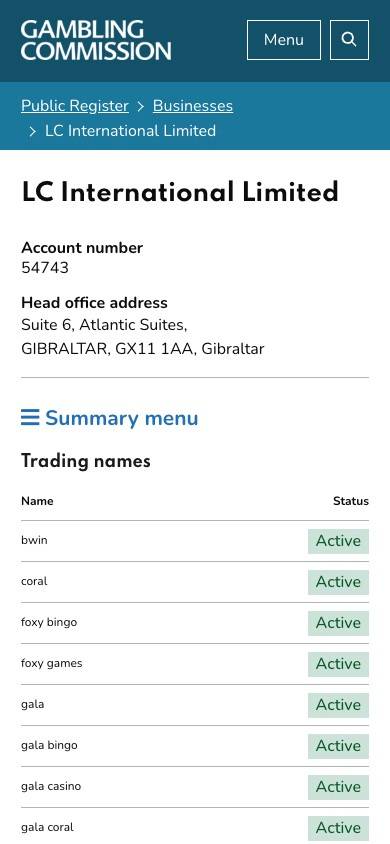
Before gambling‚ check that you meet the legal age requirement and that the service is authorised for your location. The UK Gambling Commission’s public register can help players verify licensed operators. If you cannot confirm that the bwin service presented to you is permitted in Great Britain‚ do not deposit while you seek clarification.
Set limits before playing and treat casino games as paid entertainment‚ not as a way to make money. Never gamble with borrowed funds or money needed for bills. UK players can use available account tools such as deposit limits‚ time-outs‚ and self-exclusion; the precise options should be checked in the current account settings. If gambling is causing harm‚ contact an appropriate support service in the UK‚ such as GamCare or the National Gambling Helpline.
Overall assessment
Most bwin registration issues are practical rather than mysterious: inaccurate form entries‚ a forgotten existing account‚ a delivery problem‚ or checks that need more time. Careful data entry and use of official support channels are the best first steps. The app may be convenient once an account is active‚ but it cannot bypass verification or make a restricted service available.
For UK players‚ the key decision comes before the first deposit: confirm the operator’s current licensing and terms‚ understand the verification process‚ and make sure the account details are accurate. If a registration error persists‚ document it and contact bwin through its official website or app rather than opening another account or relying on unofficial advice.